Simple example
The following VBA program creates a range that is filled with the metasyntactic variables
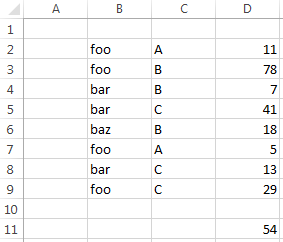
foo, bar and baz and another range that is filled with the letters A, B and C and a third range with some numbers. A sumifs() function is inserted to sum up the values of the numbers whose corresonding metasyntactic variable is bar and corresponding letter is C. The inserted formula is (with some added whitespace for clarity): = SUMIFS( $D$2:$D$9 , $B$2:$B$9 , "bar" , $C$2:$C$9 , "C")
option explicit

sub main() ' {

    testData

    dim rangeSum        as string

    dim rangeCriteria_1 as string : dim criteria_1      as string
    dim rangeCriteria_2 as string : dim criteria_2      as string

    rangeSum        = "r2c4:r9c4"
    rangeCriteria_1 = "r2c2:r9c2" : criteria_1 = """bar"""
    rangeCriteria_2 = "r2c3:r9c3" : criteria_2 = """C"""

    dim formula as string
    formula = "=sumifs(" & _
        rangeSum                            & "," & _
        rangeCriteria_1 & ","  & criteria_1 & "," & _
        rangeCriteria_2 & ","  & criteria_2 & ")"

  ' debug.print(formula)

    cells(11,4).formulaR1C1 = formula

end sub ' }

sub testData() ' {

 '
 '  Clear active sheet's data:
 '
    activeSheet.usedRange.clearContents

    cells(2, 2) = "foo" : cells(2, 3) = "A" : cells(2, 4) =  11
    cells(3, 2) = "foo" : cells(3, 3) = "B" : cells(3, 4) =  78
    cells(4, 2) = "bar" : cells(4, 3) = "B" : cells(4, 4) =   7
    cells(5, 2) = "bar" : cells(5, 3) = "C" : cells(5, 4) =  41
    cells(6, 2) = "baz" : cells(6, 3) = "B" : cells(6, 4) =  18
    cells(7, 2) = "foo" : cells(7, 3) = "A" : cells(7, 4) =   5
    cells(8, 2) = "bar" : cells(8, 3) = "C" : cells(8, 4) =  13
    cells(9, 2) = "foo" : cells(9, 3) = "C" : cells(9, 4) =  29

end sub ' }
Github repository about-Excel, path: /functions/sumifs/two-conditions.bas
Running the example results in: