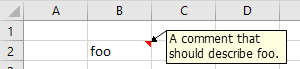
Insert a comment
option explicit

sub main() ' {

    dim cl as range
    dim cm as comment
    dim sh as shape

    set cl = cells(2,2)
    cl.value = "foo"

    set cm = cl.addComment
  '
  ' Note: the text of the comment is assigned with a method, not
  '       a property:
  '
    cm.text("A comment that" & chr(10) & "should describe foo.")
    cm.visible = true

    set sh = cm.shape

    sh.height = 25
    sh.width  = 90

    activeWorkBook.saved = true

end sub ' }
The following example checks whether the changed cell is in a specific range, and if so, hides all visible comments in that range and shows the comment for the selected range.
option explicit

sub worksheet_selectionChange(byVal rng as range) ' {

    if rng.count <> 1 then
       exit sub
    end if

    if rng.row = 5 and rng.column >= 2 and rng.column <= 37 then
       dim cel as range
       for each cel in range(cells(5,2), cells(5,37))
           cel.comment.visible = false
       next cel

       rng.comment.visible = true
    end if

end sub ' }
Bringing the ballon closer to the cell
Sometimes, the balloon is quite removed from the
cell to which it is attached.
In the
immediate window, after selecting the cell, the balloon can be brought closer to the cell by executing
selection.comment.shape.left = selection.left : selection.comment.shape.top = selection.top + 50
Alternatively, a function can be created to bring mutliple comments nearer:
sub bring_comments_near()
   for each c in selection
      if not c.comment is nothing then
         dim sh as shape
         set sh = c.comment.shape
         sh.left = c.left
         sh.top  = c.top + 50
       ' sh.textFrame.autoSize = true
       ' sh.placement = xlMoveAndSize ' Move and size with cells
      end if
   next c
end sub