The property can be set to many values. Arguably, the most often seen ones are
Inline elements cannot be assigned width nor height
For elements whose
display value is
inline (such as a
<span>), assigning a
width or height has no effect.
In the following example, each word of the first pair of words (Hello world) is in a
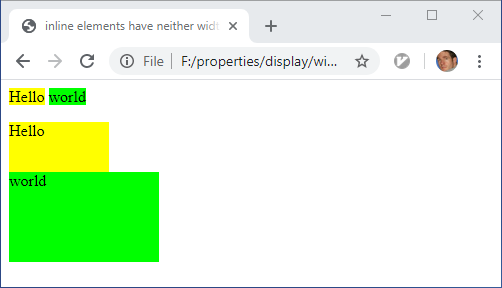
<span>, the words of the second pair are in
<div>. All elements are assigned a width and a height. Yet, as shown, only the
<div> elements are modified by the
width and
height value.
<!DOCTYPE html>
<html>
<head>
<meta content="text/html;charset=utf-8" http-equiv="Content-Type">
<title>inline elements have neither width nor height</title>
<style type='text/css'>
.hello { background-color: yellow; width: 100px; height: 50px; }
.world { background-color: lime ; width: 150px; height: 90px; }
</style>
</head>
<body>
<span class='hello'>Hello</span>
<span class='world'>world</span>
<p>
<div class='hello'>Hello</div>
<div class='world'>world</div>
</body>
</html>
display:none vs visibility:hidden
Setting an element's
CSS property display to
none does not render the element at all. For rendering purposes, it is considered inexistent.
This is different from setting the
visibility property to
hidden which only hides an element's content.
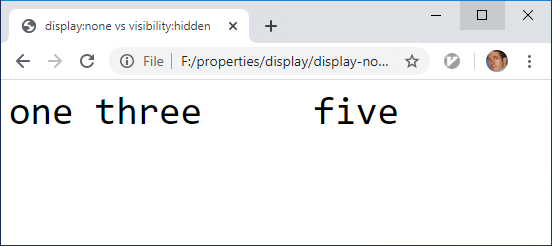
The difference is demonstrated in the folllowing simple example. The
HTML document has 5
<span> elements. The value of the property
visibility of the span whose content is
two is set to
hidden while the value of
display for the
<span> whose content is
four is set to
none. Between
one and
three, no special gap is rendered, but between
three and
five, a noticable gap is rendered because the
four is only invisible.
<!DOCTYPE html>
<html>
<head>
<meta content="text/html;charset=utf-8" http-equiv="Content-Type">
<title>display:none vs visibility:hidden</title>
<style type='text/css'>
span { font-size : 3em;
font-family: monospace
}
</style>
</head>
<body>
<span >one </span>
<span style='display:none' >two </span>
<span >three</span>
<span style='visibility:hidden'>four </span>
<span >five </span>
</body>
</html>