Add text before and/or after an element
The
content property allows to add text before and/or after an element using the pseudo selectors ::before and ::after:
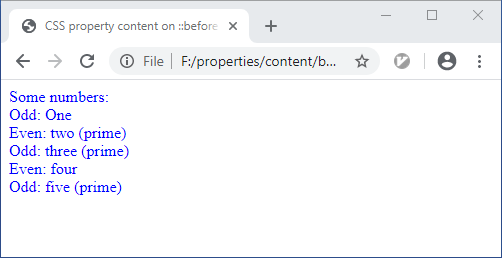
In the following example, text is prepended or appendd to an elements text depending on its classes:
<!DOCTYPE html>
<html>
<head>
  <meta content="text/html;charset=utf-8" http-equiv="Content-Type">
  <title>CSS property content on ::before and ::after pseudo elements</title>

  <style type="text/css">

     div              {color  : blue       }

     .odd::before     {content: "Odd: "    }
     .even::before    {content: "Even: "   }

     .prime::after    {content: " (prime)" }

  </style>

</head>
<body>

   <div                   >Some numbers:</div>
   <div class='odd'       >One          </div>
   <div class='even prime'>two          </div>
   <div class='odd  prime'>three        </div>
   <div class='even'      >four         </div>
   <div class='odd  prime'>five         </div>

</body>
</html>
Github repository about-css, path: /properties/content/before-after.html