Bypass the pipeline
write-host writes a string or a text representation of the cmdlet's arguments directly (aka asynchronously) to the
host's console, that is
without putting them into the
pipeline.
This behaviour is demonstrated with the following simple pipeline: an
array of three strings,
'one',
'two' and
three' is piped into a
foreach-object cmdlet whose
script block evaluates the incoming objects (strings).
If the strings ends in o (as is the case for two), then a string is written directly to the host (write-host).
If it starts with an
o, a string is written with
write-output, which essentially passes the string down the pipeline.
Otherwise, the string is passed down the pipeline unmodified.
The result of the entire pipeline is assigned to the
variable $pipelineResult:
$pipelineResult = 'one', 'two', 'three' | foreach-object {
   if ($_ -match 'o$') {
      write-host "$_ ends in o"
   }
   elseif ($_ -match '^o') {
      write-output "$_ begins with o"
   }
   else {
      $_
   }
}

''
'pipelineResult:'
$pipelineResult
When executing this example, it prints:
two ends in o

pipelineResult:
one begins with o
three
See also
this example which essentially demonstrates the same.
Colored output
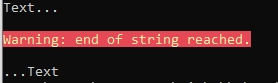
With the cmdLet's -foregroundColor and -backgroundColor options, it's possible to write colored output:
write-host "Text..."
write-host "`nWarning: end of string reached.`n" -foregroundColor yellow -backgroundColor red
write-host "...Text"
The script, when executed, prints:
Write-host considered harmful
The reason that Jeffrey Snover disourages the use of
write-host is because
write-host directly writes to the console without a possibility to redirect the output into a
log file or to use the output further down a
pipeline.