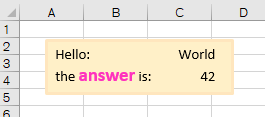
Example
option explicit

sub textBoxExample()

   dim sh As excel.shape

   set sh = activeSheet.shapes.addTextbox(          _
      orientation  := msoTextOrientationHorizontal, _
      left         :=    20, _
      top          :=    15, _
      width        :=   140, _
      height       :=    40  )

   with sh.fill
       .visible       = msoTrue
       .foreColor.rgb = rgb(255, 240, 200)
       .solid
   end with

   with sh.line
       .visible       = msoTrue
       .foreColor.rgb = rgb(255, 230, 190)
       .weight        = 2.5
   end with

   dim tf as excel.textFrame2        : set tf = sh.textFrame2
   dim tr as office.textRange2       : set tr = tf.textRange
   dim pf as office.paragraphFormat2 : set pf = tr.paragraphFormat
   dim ts as office.tabStop2         : set ts = pf.tabStops.add(msoTabStopRight, 120)

   tr.text = "Hello:"          & chr(9) & "World" & chr(13) & _
             "the answer is: " & chr(9) & 42

   dim ch as office.textRange2 : set ch = tr.characters(18, 6)
   with ch.font
       .size =   14
       .bold = true
       .fill.foreColor.rgb = rgb(255, 50, 190)
   end with

end sub
Github repository about-MS-Office-object-model, path: /Office/TextRange2/text-in-box.vb